


Full Screen mode for Apple CarPlay
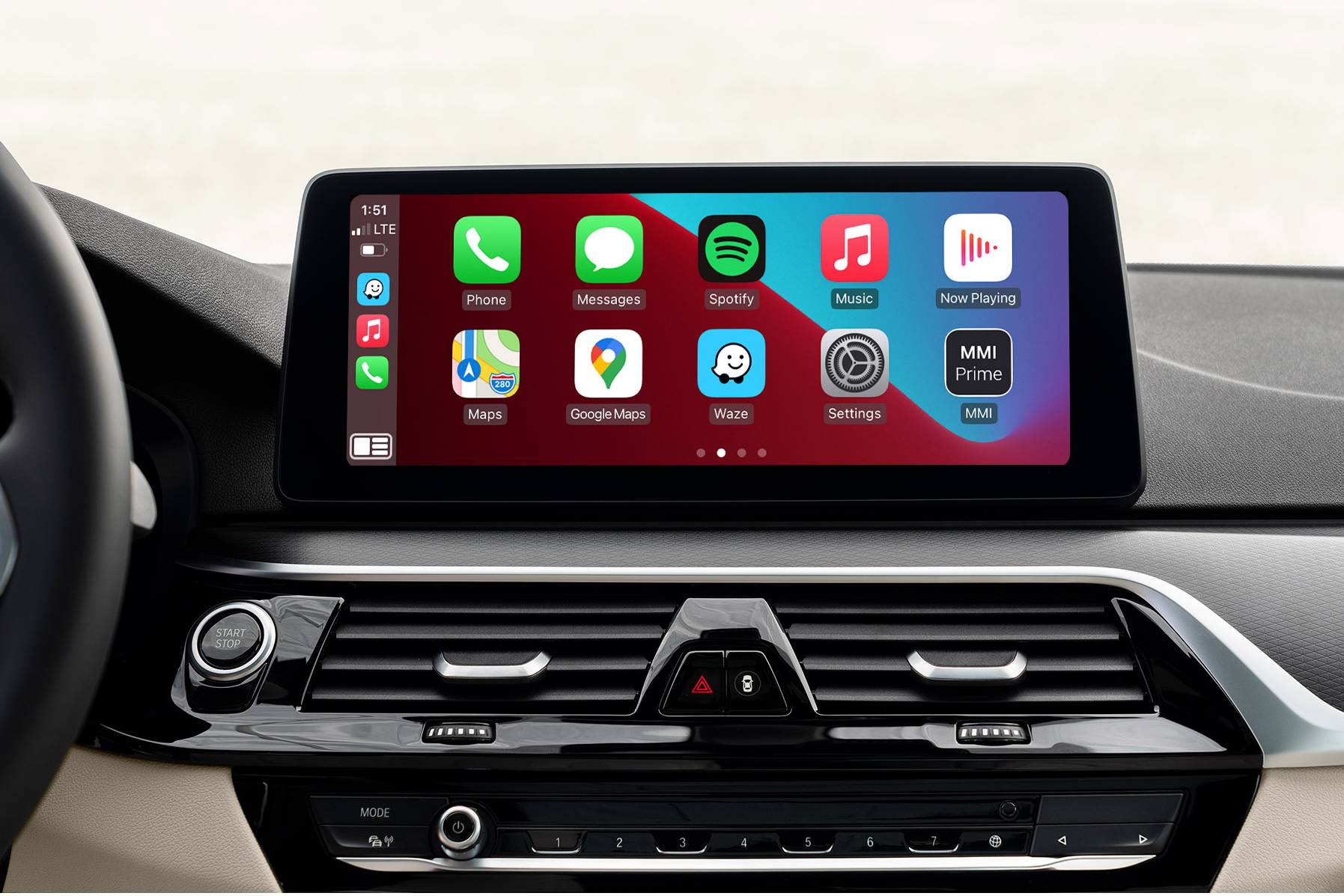
Features
- Replaces your default split screen setup with full screen mode
- Lets you see 10 app icons per page
- Gives your CarPlay apps more room to shine
- Coded via cable
Properties


* Only by entering your VIN can you be 100% sure
you get theright version of the product for your vehicle.
Where to find your VIN?
Required with this product
+$49.00

Delivery time: 2-7 business days

Free shipping worldwide
Delivery time: 2-7 business days
Free shipping worldwide
Description
Your BMW's native Apple CarPlay comes by default with a split-screen interface, fitting a total of eight app icons per screen. But, using CarPlay on a split screen is like discovering only half of its potential!
If you already have CarPlay in your NBT Evo ID5 / ID6 iDrive system and want to improve your infotainment experience, you can activate BMW CarPlay full screen, letting you see as many as 10 app icons per page. Your favourite navigation, music and messaging apps, such as Apple Maps, Google Maps, Waze, Spotify, Podcasts or WhatsApp will gain more room to shine, and you’ll finally stop having a hard time seeing what they’re showing. With full-screen CarPlay, you’ll find all information at a glance.
Please note that this feature doesn’t add Apple CarPlay to your car when purchased as a standalone option. It works only if your BMW is already equipped with CarPlay. If it’s not activated, you can purchase Apple CarPlay together with BMW Apple full-screen mode, which will be included for free.
Installation
BMW CarPlay full screen activation is carried out via a remote cable coding session. It is a very simple process that takes no more than 30 minutes. After you complete your order, we send you a coding cable (if you don't have one and add it in the top Option section). Once you receive it, you will be able to schedule a coding session for the time that suits you best. During the session, just plug in the cable, follow the instructions from our technician and he’ll take care of the activation for you.
To prepare for your coding session you will need a laptop running Microsoft Windows and a WiFi internet network that you can connect to in your car. A Mac computer running Windows is not compatible with E-Series vehicles, so in this case you will be required to use a native Windows PC. The coding cable must be plugged into a regular USB port for E-Series vehicles, or an Ethernet port for F-Series and G-Series vehicles.
A cable coding session can be conducted on all modern PCs and many Mac computers running Windows or MacOS. Find out the requirements for the cable coding session.
If at some point you’ll have to do a software update on your vehicle and your entire system along with the coded option will undergo a reset, we’ll be able to bring it back with our recoding service at an additional price. All you’ll need is a coding cable and 30 minutes for a remote coding session with our BimmerTech technician.
Comments(0)
No data found


* Only by entering your VIN can you be 100% sure
you get theright version of the product for your vehicle.
Where to find your VIN?