


Speed Limit Information for BMW
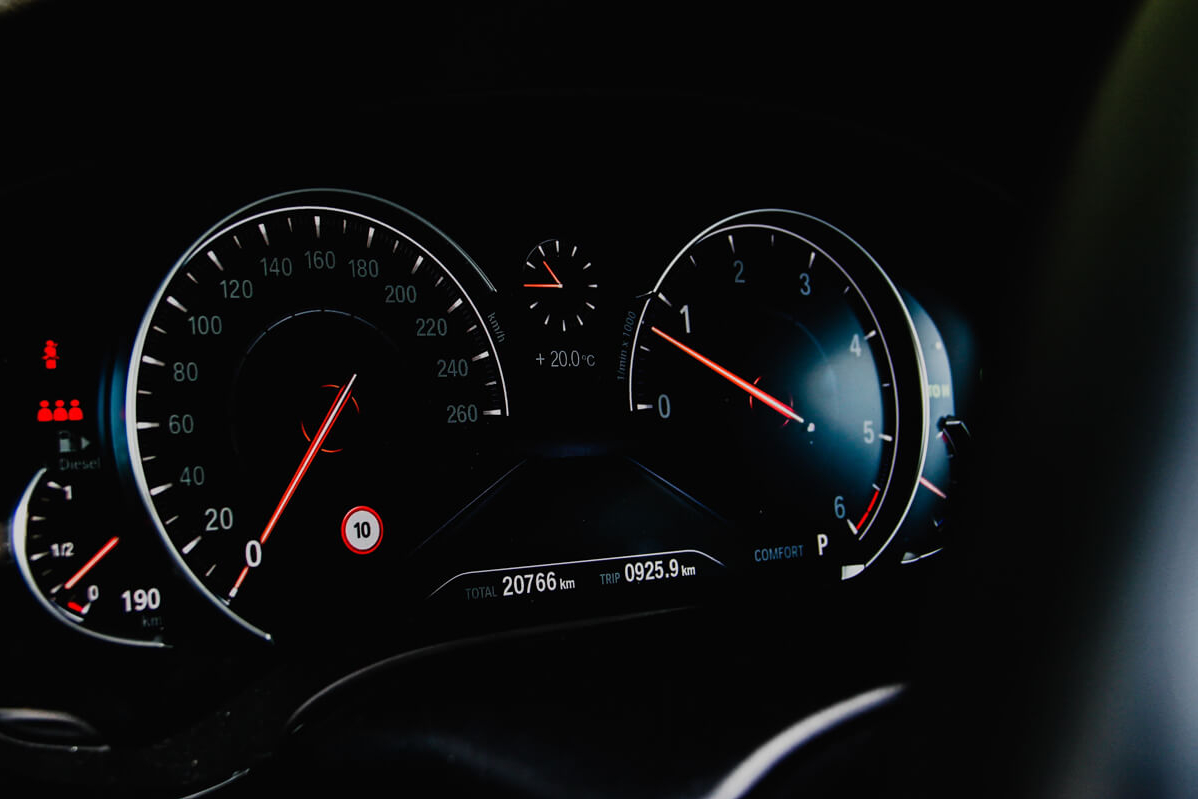
Features
- Clearly shows the speed limit on your BMW's instrument cluster
- Compatible with standard and digital clusters
- Displayed limit adjusts for each stretch of road
- Speed limit and location information comes from BMW navigation data and (in compatible vehicles) street signs
- Easily update speed limit data by updating your iDrive map
Properties


* Only by entering your VIN can you be 100% sure
you get theright version of the product for your vehicle.
Where to find your VIN?
Or select your version by yourself:
select a version for pricing

Delivery time: 7-10 business days
Depending on the product version price may change
Description
BMW's may be made with performance in mind, but it's always responsible to keep a close eye on the speed limit when driving. Knowing the limit on each stretch of road means you can be sure you're always driving safely, and helps you avoid any speeding fines.
Our Speed Limit Information (SLI) retrofit makes it easy to be sure of the speed limit when you're on the road. A clear and easy-to-see indicator will be added to your BMW's instrument cluster — right beside the speedometer — showing the speed limit on your current stretch of road. Even if there's no speed limit sign in sight, you'll still know when it's time to slow down, and when you can push the throttle.
As well as activating the systems in the latest high-end BMWs, using cameras that read roadside speed limit signs, we also offer a standalone module that doesn't require any extra peripheral hardware. It's perfect for a wide range of vehicles, including older BMWs. The small module can easily be hidden out of sight, so you'll still have a clean, uncluttered factory look.
To check the speed limit where you're driving, the module connects to your BMW's native iDrive navigation system. Checking your current location and the speed limit for that road, a small icon appears below your dials showing the maximum speed. In vehicles with a Head-Up Display (HUD), the speed limit will also appear alongside the other information on your windscreen. As you drive from street to street, the speed limit indicator automatically updates.
As the accuracy of the indicator can depend on how up-to-date your BMW's navigation data is, we always recommend ensuring your maps are updated regularly. You can get the latest BMW navigation map data from BimmerTech.
Please note that this product may not work in areas where BMW's map data does not include speed limit information. North America and most of Europe are covered, availability in other regions may vary. Please ensure your local maps include speed limit information before purchasing. The shape of the speed limit icon (square for North America, circular for the rest of the world) will be preset to match the road signs in your country.
Installation
Depending on your vehicle, Speed Limit Information for BMW can be activated either through coding, or by adding a dedicated module. To find out more about how to add Speed Limit Information to your vehicle, type in your VIN.
Comments(0)
No data found


* Only by entering your VIN can you be 100% sure
you get theright version of the product for your vehicle.
Where to find your VIN?